



Description
A code snippet manager that lets you save code fragments and reuse them whenever you need them with a simple keyboard shortcut, via drag-and-drop, or by copying and pasting.
README
4DPop KeepIt




4DPop KeepIt is a snippets manager, these little bits of code or text that you reuse everywhere.
This tool allows you to store pieces of code and reuse them when needed through:
- a keyboard shortcut
- drag and drop
- copy and paste
Stored items are persisted across sessions and remain accessible from all databases once the component is loaded.
4DPop KeepIt is similar to 4D macros, but easier to use and more powerful.
Component installation
Make sure the 4DPop component is installed.
This component is compatible with the Project Dependencies feature. You can easily integrate it into your project by selecting “Design” > “Project Dependencies,” then choosing the GitHub tab and adding “vdelachaux/4DPop-KeepIt” as the repository address in the dialog box provided for this purpose. This will allow you to receive updates over time.
📍No more notarisation problems with this installation method!

If the component 4DPop is not installed, create a method that calls:
KeepIt_toolMemorize a fragment
- Select a snippet of code in the editor.
- Drag it onto the 4DPop toolbar.
- Drop it on the KeepIt button.
- Enter a name for the new item.
Done.
Use a fragment
In the editor, type:
$$ + Tab
A popup menu appears.
Select the desired item and its content is pasted into the editor.
Tags
- Snippets can contain tags evaluated at insertion time.
- They use the same syntax as 4D macro tags.
- In addition to native 4D macro tags, KeepIt adds the following.
<uid/>
Replaced by a generated UID.
<database_name/>
Replaced by the structure file name.
<keepit/>
Includes another KeepIt item.
Attribute
name: item name to include
Example:
<keepit name="common_declaration"/><ask/>
Creates an interactive macro.
Attributes
message: displayed prompt texttype: expected answer type
Example:
ARRAY TEXT(<ask message="Name of the array?"/>;<ask message="Size of the array?"/>)
For($i;1;Size of array(<ask message="\1"/>);1)
    <ask message="\1"/>{$i}:="<ask message="Default value?"/>"
End for
Will display successively:
- A first dialog asking for the name of the table.
- A second dialog to request the array size.
- Finally a third box to ask for the default.
The two tags <ask message="\1"/> will be replaced by the answer to question#1 ie the table name.
So, if you answer successively «$arrayText», «10» & «empty» the generated code will be:
ARRAY TEXT ($arrayText;10)
For ($Lon_i;1; Size of array ($arrayText);1)
    $arrayText{$Lon_i}:="empty"
End for
Supported type values:
textintegerrealtablefieldusergroup{value1;value2}{label1:value1;label2:value2}
<file/>
Replaced by the content of a text file.
Attribute
url: POSIX path of the file to load
Supported forms:
- absolute path:
file://... - relative to database
Resources:#... - relative to KeepIt
Resources:/...
Note: The file may contain tags that will be processed first
<iteration/>
Repeats a line multiple times.
Attribute
count
Example:
<iteration count="10"/>C_TEXT(vTEXT_<iteration/>)<method-attribute/>
Sets a project method attribute.
Attributes
typevalue
Example:
<method-attribute type="1" value="true"/><method_type/>
Replaced by the type of the currently edited method.
Conditional tags
#_IF
#_ELSE
#_ENDIF
Example:
#_IF <ask message="Are you a woman ?" type="{Yes:1;No:0}"/>=1
// OK, you are a woman!
#_ELSE
// You are probably a man
#_ENDIF
Managing snippets
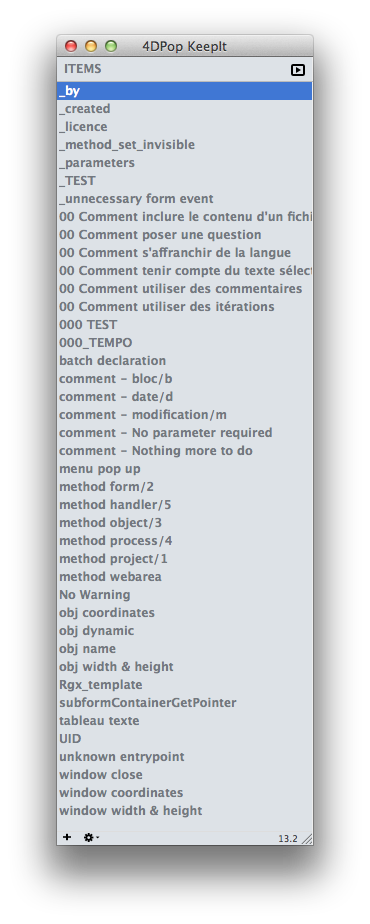
Click the KeepIt toolbar button to open the editor.
 |
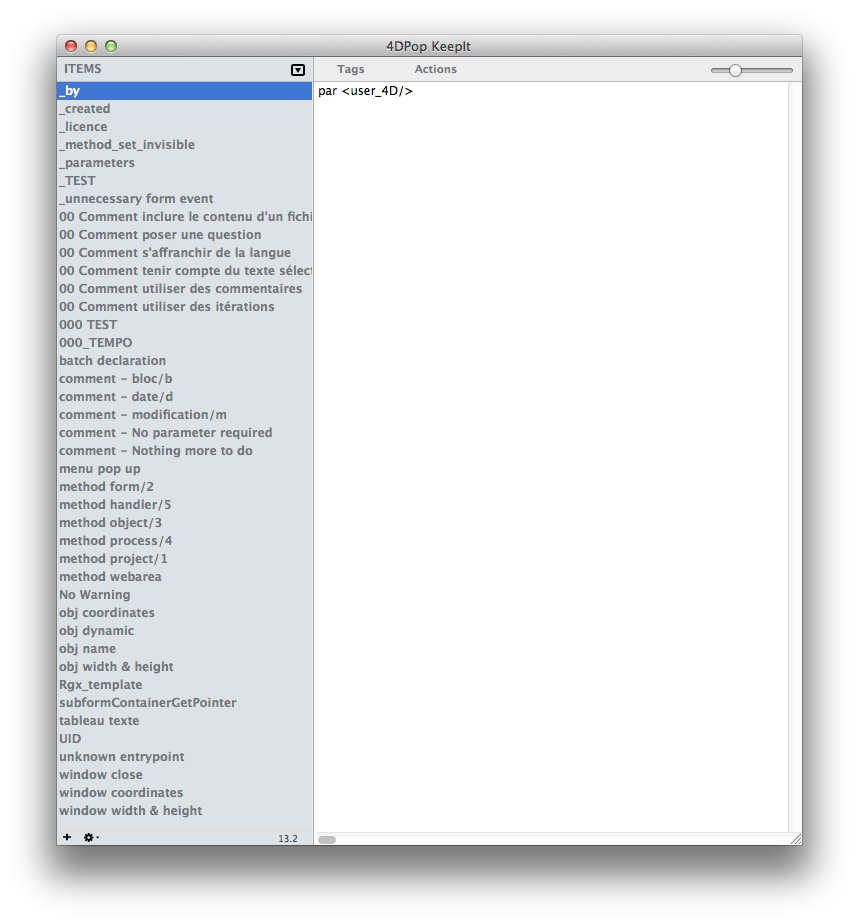 |
Features:
- drag item into method editor
- copy interpreted content to clipboard
- rename by double-click
- edit text in right pane
- context menu actions
- export/import snippets
- drag export to desktop
- drop text files to import
- Comments are supported:
/* ... */
The first comment becomes the tooltip.
4D macros integration
KeepIt installs 3 macros when loaded.
| Name | Shortcut | Text entry | Description |
|---|---|---|---|
| KeepIt | Cmd + € | $$ |
Displays selection menu |
| KeepIt = | Cmd + = | ++ |
Calls last snippet |
| KeepIt + | Cmd + ± | — | Creates fragment from selection |
Shared method
A shared method is available:
Keepit_get_item_by_nameIt can be used inside 4D macros.
Example:
<method>Keepit_get_item_by_name("database_name")</method>Source code
The component is distributed compiled.
Source code is available in the Sources folder inside the component folder.
Forum
Dedicated forum:
- 4DPop Forum
Appendix — Tokenization tags
Useful for 4DFR / 4DINTL compatible macros.
<command/>
Localized 4D command name.
Attribute
number
Example:
<command number="34"/><constant/>
Localized 4D constant.
Attribute
id
Example:
<constant id="2.2"/>Control flow localization tags
<if/>
<else/>
<end_if/>
<case_of/>
<end_case/>
<while/>
<end_while/>
<for/>
<end_for/>
<repeat/>
<until/>
These tags are replaced by localized control structures.
This allows the same snippet to work in:
- 4D INTL
- 4D FR
For example this code:
//Run 4DPop
//This code is available even if the component is not present like in the final application.
<if/> (<command number="34"/>(<command number="492"/>))
  <command number="222"/>($tTxt_Components;0)
  <command number="1001"/>($tTxt_Components)
  <if/> (<command number="230"/>($tTxt_Components;"4DPop")>0)
    <command number="1007"/>("4DPop_Palette")
  <end_if/>
<end_if/>
Will be pasted in a 4D INTL like this:
//Run 4DPop
//This code is available even if the component is not present like in the final application.
If ( Not ( Is compiled mode ))
  ARRAY TEXT ($tTxt_Components;0)
  COMPONENT LIST ($tTxt_Components)
  If ( Find in array ($tTxt_Components;"4DPop")>0)
    EXECUTE METHOD ("4DPop_Palette")
  End if
End if
and like this in a 4D FR language:
//Run 4DPop
//This code is available even if the component is not present like in the final application.
Si ( Non ( Mode compile ))
  TABLEAU TEXTE ($tTxt_Components;0)
  LISTE COMPOSANTS ($tTxt_Components)
  Si ( Chercher dans tableau ($tTxt_Components;"4DPop")>0)
    EXECUTER METHODE ("4DPop_Palette")
  Fin de si
Fin de si